1. Little-Endian vs Big-Endian
A 16-bit integer is made up of 2 bytes. Computers differ in the order they store these bytes in memory.
- Little-Endian: The low-order byte is stored at the starting address (the “little end” comes first). This is used by Intel x86 processors (most PCs).
- Big-Endian: The high-order byte is stored at the starting address (the “big end” comes first). This is used by older Motorola processors and many RISC architectures. We refer to the format used by a specific computer as the Host Byte Order.
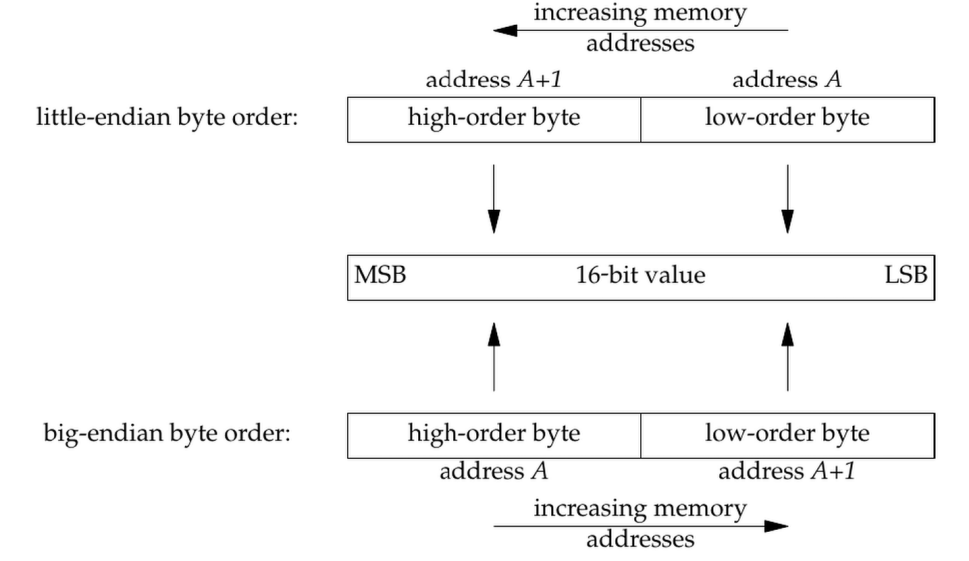
2. The Solution: Network Byte Order
Because different computers have different internal formats, they would garble data if they talked directly to each other. To solve this, the Internet protocols established a standard called Network Byte Order.
Note
Network Byte Order is always Big-Endian. You must convert your data from your computer’s format (Host Byte Order) to the network’s format (Network Byte Order) before sending it.
3. The conversion function
The sockets library provides four functions to handle this conversion automatically. You should use these functions even if your computer is already Big-Endian (in which case the functions do nothing), because it ensures your code is portable to any machine.
htons(Host to Network Short): Converts a 16-bit integer (e.g., a port number) from your computer’s order to network order.htonl(Host to Network Long): Converts a 32-bit integer (e.g., an IP address) from your computer’s order to network order.ntohs(Network to Host Short): Converts a 16-bit integer received from the network back to your computer’s order.ntohl(Network to Host Long): Converts a 32-bit integer received from the network back to your computer’s order.